 Help Center
What's New
What's New
Archive Call and Meeting Transcriptions
06/30/2026
LeadCenter can now archive phone call and meeting transcriptions to your Smarsh Professional Archive journal address, or to a generic email inbox using Archive to email.
This gives firms another way to retain communication records through the same daily email-journal pipeline used for text messages and marketing emails.
What’s New
- Call transcription archiving — Archive phone call transcriptions from LeadCenter call logs and supported calling integrations.
- Meeting transcription archiving — Archive virtual meeting transcriptions and in-person meeting transcriptions.
- Archive type controls — Turn text messages, marketing emails, call transcriptions, and meeting transcriptions on or off independently.
How It Works
Go to Settings > Integrations > Archive, choose Smarsh Professional Archive or Archive to email, then enter the Destination address and select the archive types you want.
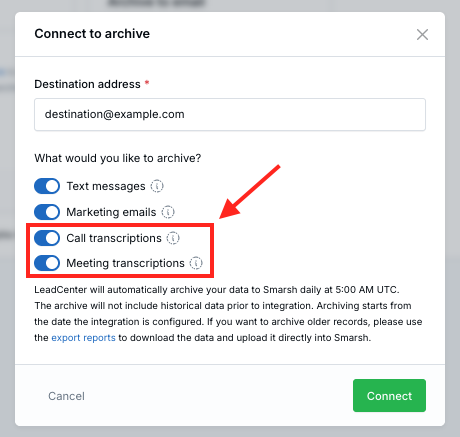
LeadCenter validates that the destination domain has mail records when you connect. An initial sync for today’s data is queued automatically.
Daily Archive Schedule
LeadCenter runs a daily archive job at 5:00 AM UTC for the previous day’s communications. You can also trigger a manual sync after connecting or from the integrations page if you have the appropriate permissions.
Smarsh Configuration
Archive emails include an X-Smarsh-MsgType header so Smarsh can classify the channel. Call transcriptions use Call Transcription, and meeting transcriptions use Meeting Transcription.
Your Smarsh administrator may need to configure network mapping rules in Smarsh to recognize these header values.
Why It Matters
- More complete communication records — Firms can include call and meeting transcriptions in their archive workflow.
- Centralized archive settings — Archive types can be managed from the connected archive integration.
- Compliance-friendly delivery — Transcriptions are delivered through the same daily journal process used for other archived communications.
Questions? support@leadcenter.ai

Need more help?
If you can't find the answers you're looking for, our support specialists are available to answer your questions and troubleshoot if necessary.
-
Phone Call (888) 291-7116. Our main hours are Monday to Friday 7 am-5 pm Central Time.
-
Support Send your questions and inquiries via email to support@leadcenter.ai. A support ticket will be created and one of our team members will get back to you as quickly as possible.