 Help Center
What's New
See Household Tasks From Any Family Member's Contact Record
09/17/2026
You can now review tasks for an entire household from the Tasks tab of the contact already on your screen. Use the new This Contact / Household toggle to move between that person's work and the family's work without opening the household record or switching between family members.
What's Improved
- See household follow-up together: When another family member has tasks, Household is selected by default and brings the household's visible tasks into one list.
- Know who each task belongs to: Each row includes a related to link that identifies the family member and opens their contact preview.
- Keep working from the same view: Search, filters, due-date sorting, editing, bulk selection, and rescheduling remain available.
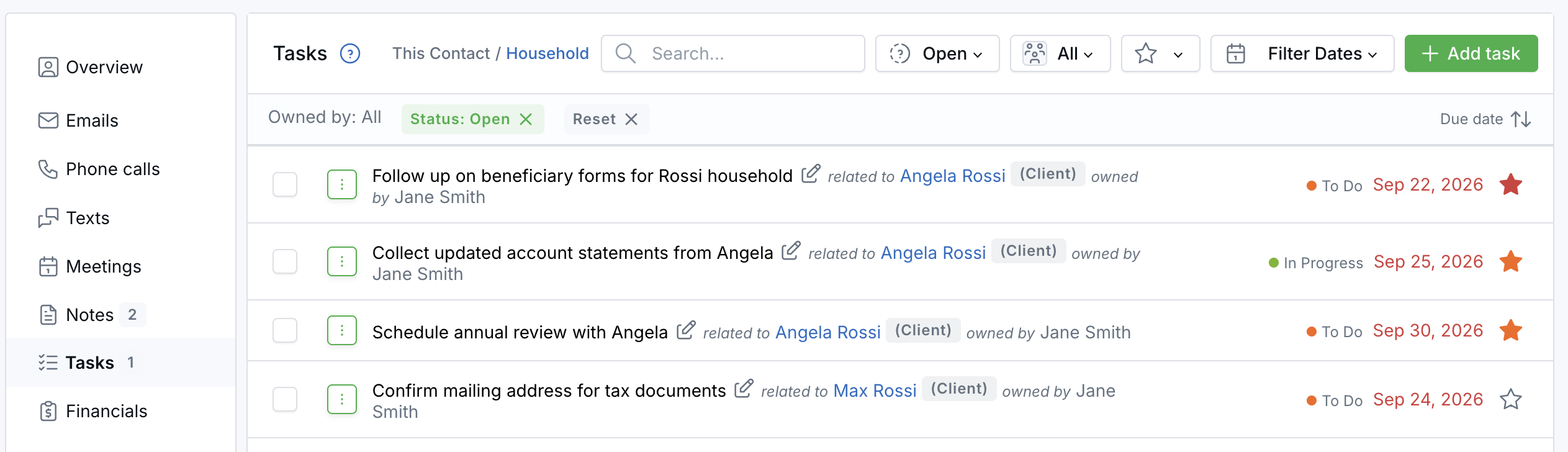
Add task still creates a task for the contact you are viewing. Use Additional contacts when a task should be linked to multiple people. The Tasks tab badge also continues to count only the current contact's open tasks.
Why It Matters
When preparing for a review or following up with a family, you can see what is outstanding across the household and take action without losing the contact context you are already working in.
Questions? support@leadcenter.ai

Need more help?
If you can't find the answers you're looking for, our support specialists are available to answer your questions and troubleshoot if necessary.
-
Phone Call (888) 291-7116. Our main hours are Monday to Friday 7 am-5 pm Central Time.
-
Support Send your questions and inquiries via email to support@leadcenter.ai. A support ticket will be created and one of our team members will get back to you as quickly as possible.