 Help Center
What's New
Update: Improved Financial Account Layout and Orion Transactions
05/20/2026
Starting Thursday, May 21, we’re rolling out improvements to the financial account layout in LeadCenter, along with Orion transaction sync on account details pages.
These improvements make account relationships easier to understand, especially for firms using Orion-linked accounts and sleeved registrations. This release also adds Orion transaction sync, so supported transaction activity can appear directly on account details pages.
Coming May 21: These updates apply to financial accounts in LeadCenter, with several improvements specifically for firms connected to Orion. If you do not see these changes yet, they will become available after the release is deployed.
What’s Included
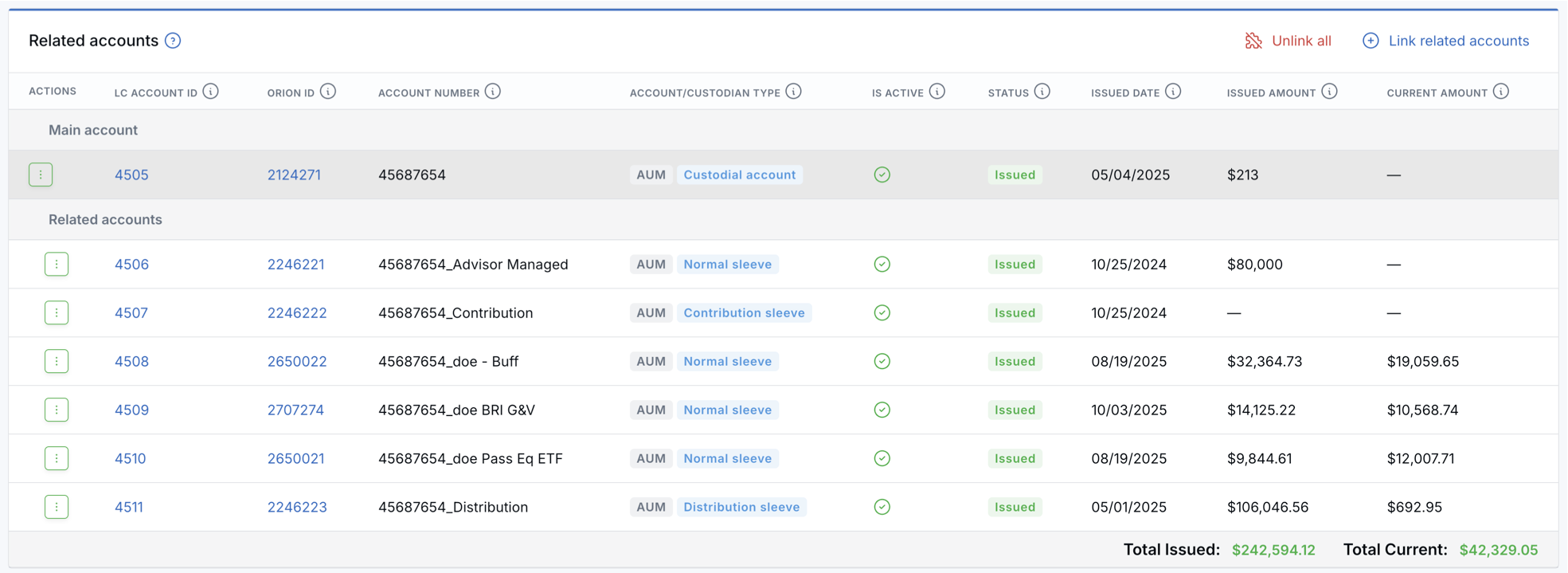
- Related accounts are easier to understand — Account groupings now use clearer LeadCenter language while still preserving Orion-specific sleeve details where relevant.
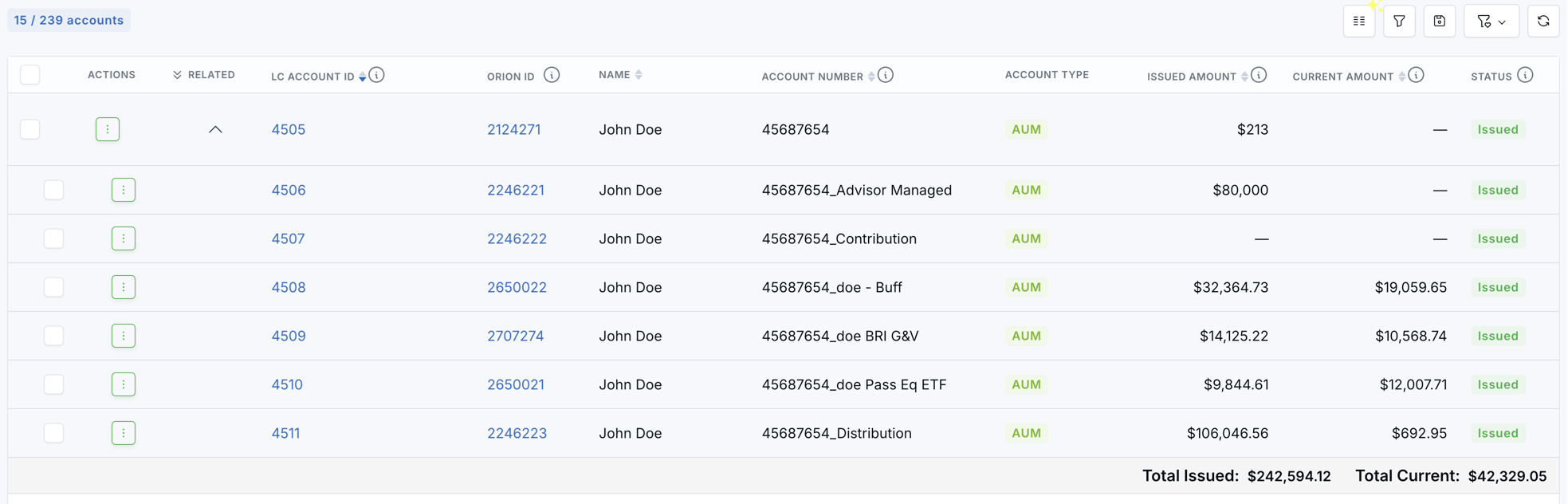
- Account groups are easier to review — Main accounts and related accounts now display more clearly across account detail pages and the All Accounts page.
- Totals are cleaner — LeadCenter now calculates group totals using the main account plus all related accounts.
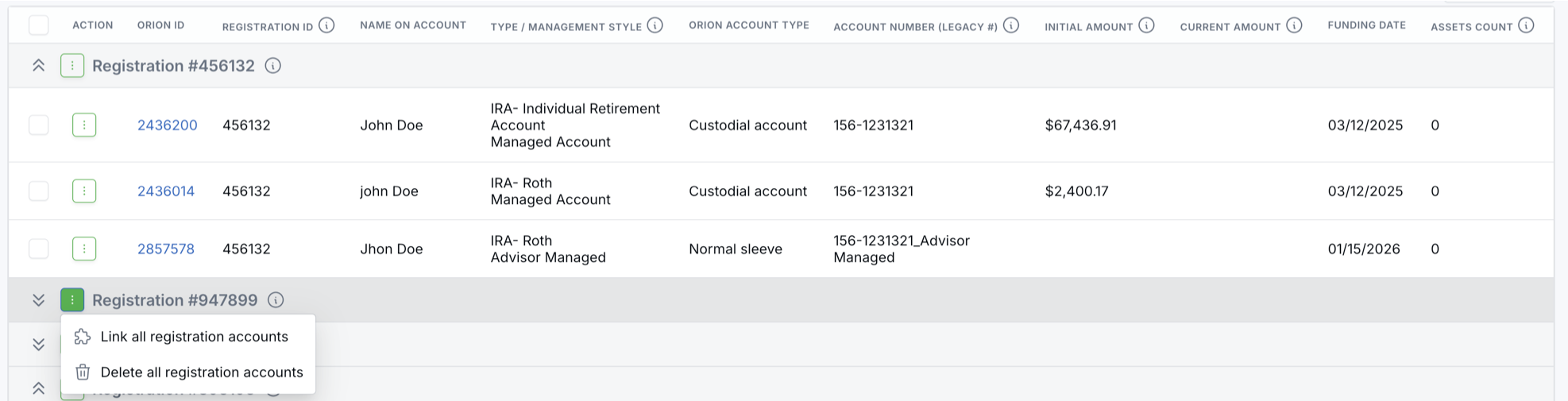
- Account linking is easier — Orion unlinked accounts can now be grouped by registration, making it easier to review and link accounts that belong together.
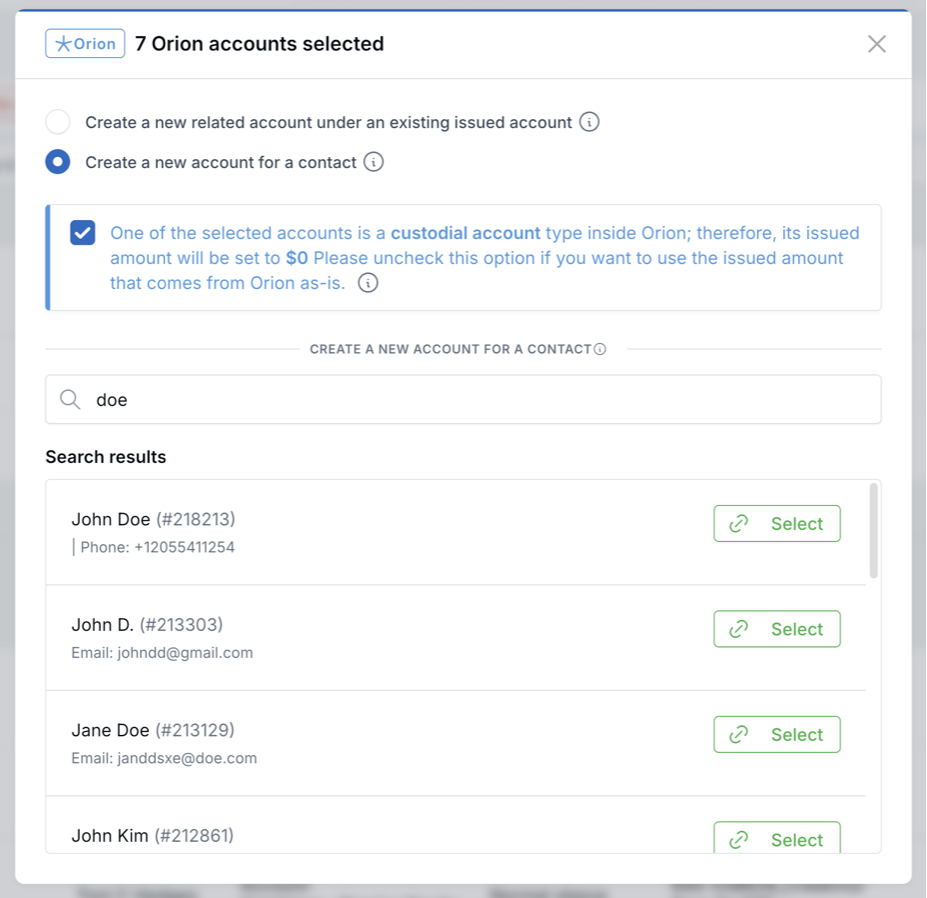
- Custodial accounts are handled more safely — When linking Orion registrations, LeadCenter can set custodial wrapper issued amounts to $0 to help avoid double-counting.
- Orion transactions sync automatically — Supported Orion transactions can now appear directly on the account details page.
- Transaction actions are available from the account record — Eligible transactions can be converted into account actions such as sleeve accounts or company fee payments.
A Quick Orion Terms Refresher
In Orion, a sleeved registration can include a custodial account and one or more sleeves. LeadCenter now handles these structures more clearly so the account group is easier to review and report on.
- Custodial account — The main account held at the custodian. In a sleeved registration, this acts like the parent account, while the sleeves represent different portions of that account.
- Normal sleeve — A standard investment sleeve inside the custodial account. Normal sleeves are typically tied to a model, strategy, or investment allocation.
- Contribution sleeve — A sleeve used to manage incoming money, such as deposits or contributions.
- Distribution sleeve — A sleeve used to manage outgoing money, such as withdrawals or distributions.
Plain English: think of the custodial account as the full account at the custodian. A normal sleeve is one investment bucket inside that account. The contribution sleeve handles money coming in, and the distribution sleeve handles money going out.
Improved Financial Account Layout and Management
On account detail pages, the previous Sleeves section is now labeled Related accounts. This helps avoid confusion between LeadCenter account groupings and Orion’s own sleeve terminology. If an account belongs to a related account group, LeadCenter shows the main account and related accounts together so you can see the full picture.
On the All Accounts page, collapsed groups show the total issued and current amounts for the full group. When you expand a group, LeadCenter shows the main account and related accounts separately, along with a total row for the group.

The Orion Unlinked Accounts page now groups accounts by Orion registration ID. This makes it easier to identify which Orion accounts belong together before linking them into LeadCenter.
When linking an Orion registration that includes a custodial wrapper, LeadCenter can set the custodial account’s issued amount to $0. This helps prevent the same money from being counted twice when the actual value is represented inside the related sleeves.
Orion Transactions on Account Records
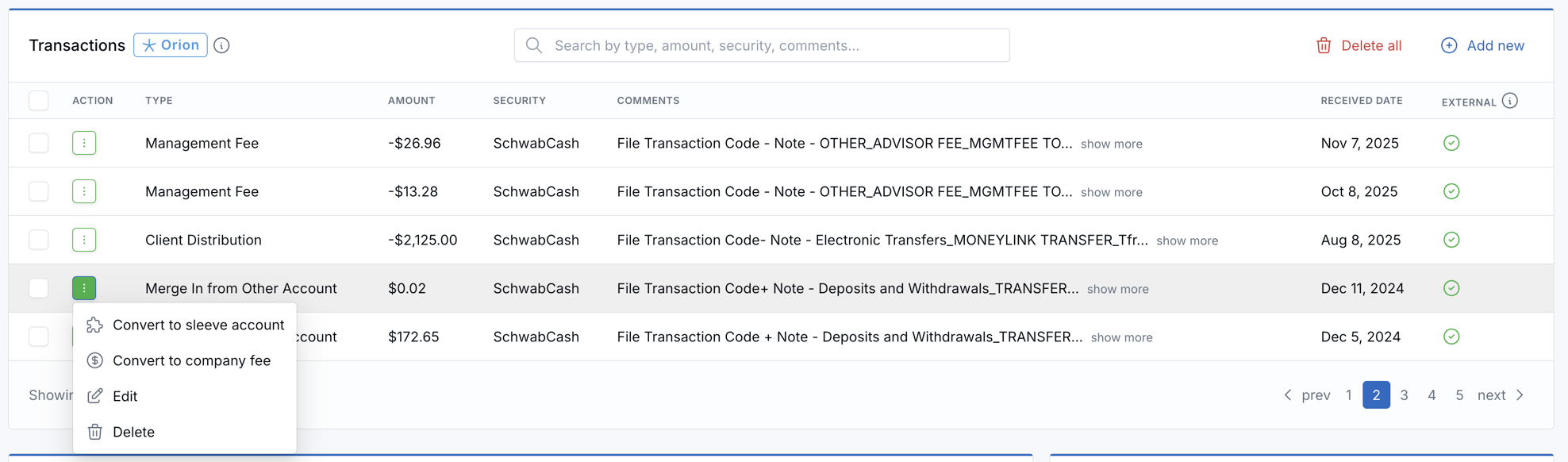
For firms connected to Orion, LeadCenter will automatically sync supported transaction activity and display it directly on account details pages. This gives your team one place to review Orion transaction activity and take action on it without leaving the account record.
Open the account details page and look for the Transactions card. From there, you can review synced transactions, search them by type, amount, security, or comments, and select multiple transactions for bulk actions.
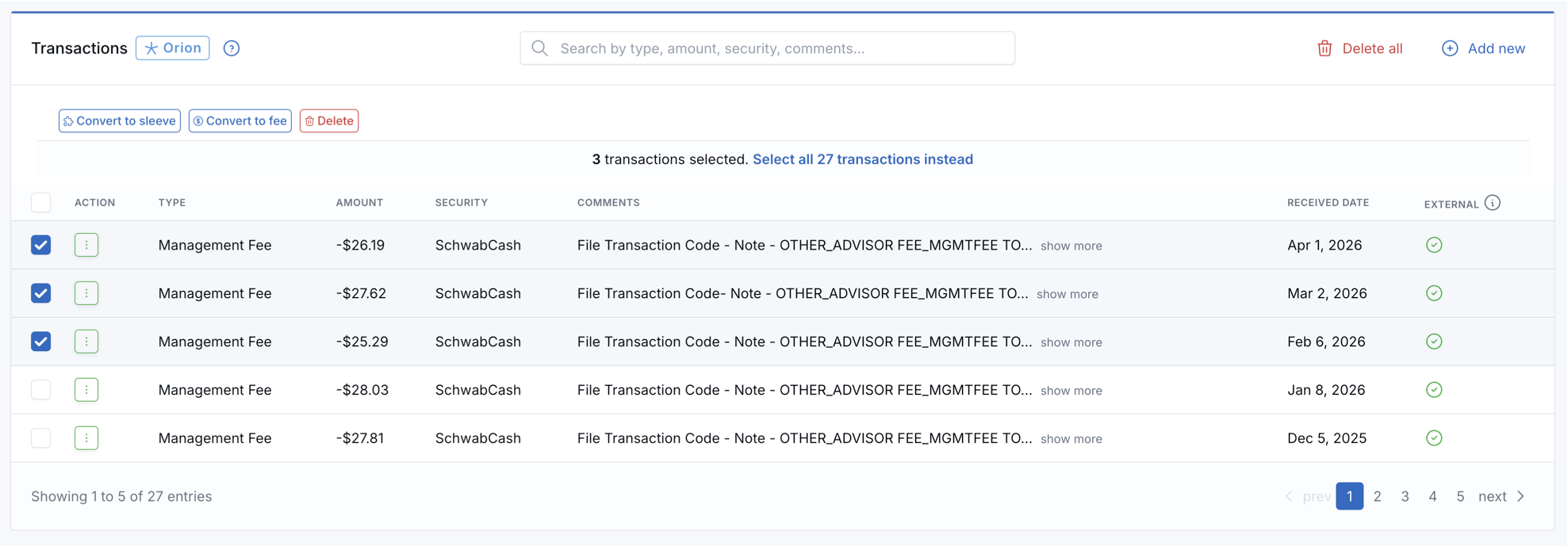
Use the action menu on an individual transaction to convert it into a sleeve account or a company fee. Bulk actions are also available for sleeve conversion, fee conversion, and deletion.
Additional Improvements
- Clickable Orion IDs — Orion account IDs can now be opened directly in Orion from more places in LeadCenter.
- Optional Orion columns — Orion ID and Orion registration ID can be added to the All Accounts page using the column picker when Orion is connected.
- Clearer column names and tooltips — Several account columns now have clearer names and helpful explanations.
- Pull accounts with no current value — A new Orion setting allows LeadCenter to pull accounts with no current value, which is useful for custodial wrappers, contribution sleeves, distribution sleeves, and newly opened accounts that have not been funded yet.
- Daily transaction syncing — New supported Orion transactions continue syncing daily to help keep account activity up to date.
Why It Matters
- More confidence in account views — Advisors and operations teams can more easily understand which account they are viewing and how it fits into the full account group.
- Cleaner reporting — Group totals and custodial account handling help reduce confusion and avoid double-counting custodial wrapper values.
- Easier account linking — Grouping unlinked Orion accounts by registration makes it easier to link related accounts together correctly.
- Better transaction visibility — Orion transaction activity can be reviewed directly from the account record instead of switching between systems.
- Faster account actions — Eligible transactions can be converted into sleeve accounts or company fee payments directly from LeadCenter.
Questions? support@leadcenter.ai

Need more help?
If you can't find the answers you're looking for, our support specialists are available to answer your questions and troubleshoot if necessary.
-
Phone Call (888) 291-7116. Our main hours are Monday to Friday 7 am-5 pm Central Time.
-
Support Send your questions and inquiries via email to support@leadcenter.ai. A support ticket will be created and one of our team members will get back to you as quickly as possible.