 Help Center
What's New
What's New
More Precise Age Filtering
07/24/2026
Age filters now support more precise age values. Instead of filtering by whole years only, you can enter years plus optional months and days when using the Age condition.
What’s Improved
- More precise filtering — Use years, months, and days to build Age conditions that match the exact audience you need.
- Available in more workflows — The updated Age condition is available in advanced filters for Contacts and Sales Pipeline, when building or editing Segments, and in Workflow Filter nodes.
- No changes needed for saved filters — Existing Age rules that only use years continue working as before.
How It Works
Choose the Age field, select a comparison, then enter years and optional months or days. For example, you can filter for contacts who are at least 59 years and 6 months old without converting that age into a date of birth.
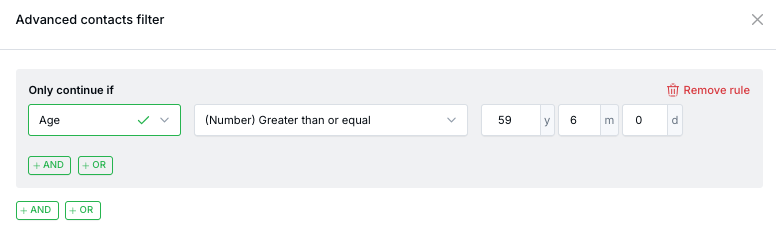
Age is calculated from each contact’s date of birth relative to today, so saved filters, segments, and workflow rules stay current over time.
Questions? support@leadcenter.ai

Need more help?
If you can't find the answers you're looking for, our support specialists are available to answer your questions and troubleshoot if necessary.
-
Phone Call (888) 291-7116. Our main hours are Monday to Friday 7 am-5 pm Central Time.
-
Support Send your questions and inquiries via email to support@leadcenter.ai. A support ticket will be created and one of our team members will get back to you as quickly as possible.