 Help Center
What's New
New Option: Exclude Production Split from Commission Calculation
03/05/2026
When multiple writing advisors share a financial account, the production split shows how credit is allocated (for example, 50/50). By default, LeadCenter also uses that split in the automated commission calculation. Now you can choose whether the production split should be included in the commission calculation while still keeping it for reporting.
What’s New
- New per-advisor commission setting — Keep production split for reporting, and choose whether it applies to commission calculations.
- Clear indicator — Advisors using this setting show an Excluded badge next to their production split.
How It Works
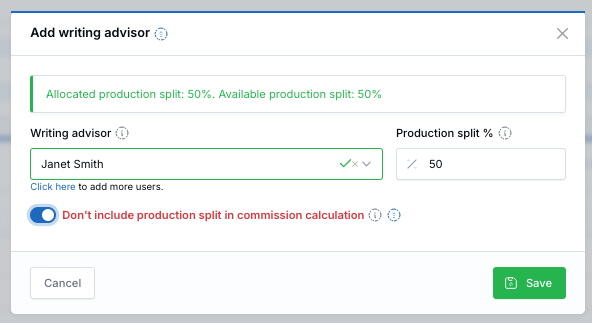
By default, LeadCenter applies the production split in the automated commission calculation formula. That means an advisor with a 50% split is calculated on 50% of the account value. When you enable "Don't include production split in commission calculation", the split is still recorded and displayed for reporting, but it is excluded from the automated commission calculation for that advisor.
Default formula (split included): Commission Amount = Commission % × Product Fee × Amount Issued × Production Split %
With this option enabled (split excluded): Commission Amount = Commission % × Product Fee × Amount Issued
Example
- Default behavior: If an advisor has a 50% production split, commission is calculated using 50% of the issued amount.
- With this option enabled: The split is still shown for reporting, but commission is calculated without applying the split.
How to enable
- Open a financial account detail page.
- In Writing Advisors, click Add (new) or Actions → Edit (existing).
- Turn on "Don't include production split in commission calculation".
- Click Save.
What is affected
- Commission amount — For that advisor, commission is calculated without applying the production split.
- YTD production — The full account value counts toward the advisor’s year-to-date production total (used to determine their commission plan tier).
Tip: When enabled, an Excluded badge appears next to the advisor’s production split in the Writing Advisors table.
Why It Matters
- Supports different compensation policies — Track splits for reporting while keeping commission calculations aligned to your firm’s rules.
- Clear visibility — The split is still displayed, and the Excluded badge makes the behavior easy to confirm.
- Cleaner plan tracking — YTD production reflects the full account value for plan tier calculations.
Questions? support@leadcenter.ai

Need more help?
If you can't find the answers you're looking for, our support specialists are available to answer your questions and troubleshoot if necessary.
-
Phone Call (888) 291-7116. Our main hours are Monday to Friday 7 am-5 pm Central Time.
-
Support Send your questions and inquiries via email to support@leadcenter.ai. A support ticket will be created and one of our team members will get back to you as quickly as possible.