 Help Center
What's New
New: Download Call and Meeting Transcripts as PDF
04/01/2026
You can now download call and meeting transcripts as PDF directly from LeadCenter. This makes it easier to save, print, and share conversation records in a clean format without copying transcript content manually.
What’s New
- Download transcripts as PDF — Export transcript content directly from LeadCenter with one click.
- Capture the full conversation clearly — PDFs include speaker turns, participant names, date, and duration in a clean, printable layout.
- Use the same output for calls and meetings — This works for both phone call transcripts and meeting transcripts.
How It Works
For calls, go to Calls, or open a contact and go to the Calls tab. Click the button under Transcription to open the transcript viewer.
For meetings, open the appointment details as if editing the appointment, then click Actions and choose View transcription. You can also access meeting transcripts from the contact details page under the Meetings tab.
Once the transcript has fully loaded, click Download PDF. LeadCenter will generate the PDF automatically using the latest available transcript data.
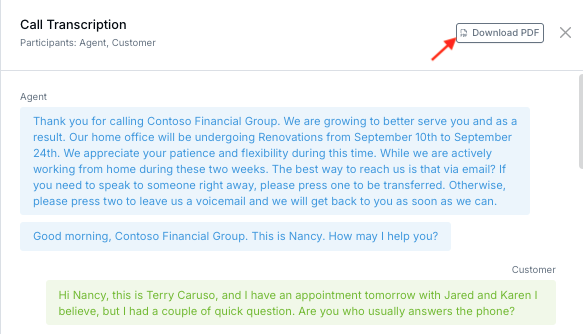
The downloaded PDF includes the call or meeting date and time, duration, participants, and the full transcript with speaker timestamps in a format that is easy to review or share.
Why It Matters
- Make transcript records easier to use — Save conversations in a format that is easier to print, review, and reference later.
- Support cleaner handoffs and documentation — Share transcript content more easily across teams or external workflows.
- Reduce manual work — Export the transcript directly instead of copying and formatting conversation text manually.
Questions? support@leadcenter.ai

Need more help?
If you can't find the answers you're looking for, our support specialists are available to answer your questions and troubleshoot if necessary.
-
Phone Call (888) 291-7116. Our main hours are Monday to Friday 7 am-5 pm Central Time.
-
Support Send your questions and inquiries via email to support@leadcenter.ai. A support ticket will be created and one of our team members will get back to you as quickly as possible.