 Help Center
What's New
Switch to Annual Billing from Your Subscription Page
09/03/2026
Monthly-billed customers can now switch eligible LeadCenter licenses to discounted annual billing directly from the Subscription page. Before confirming, you can review which licenses will change, your new annual totals, credit for unused monthly service, and the amount that will be charged today.

What's New
- Switch without contacting support — Open Actions on the Subscription page and select Switch to annual billing, or use the link next to the Monthly badge.
- Review the financial impact first — The preview shows eligible licenses, annual totals, unused monthly credit, and the amount due today.
- Move eligible licenses immediately — AI CRM, phone, text messaging, and landing page builder licenses move to annual pricing after confirmation.
How It Works
Open Subscription, choose Switch to annual billing, and review the preview. Select the checkbox confirming the amount due today, then select Confirm switch to annual.
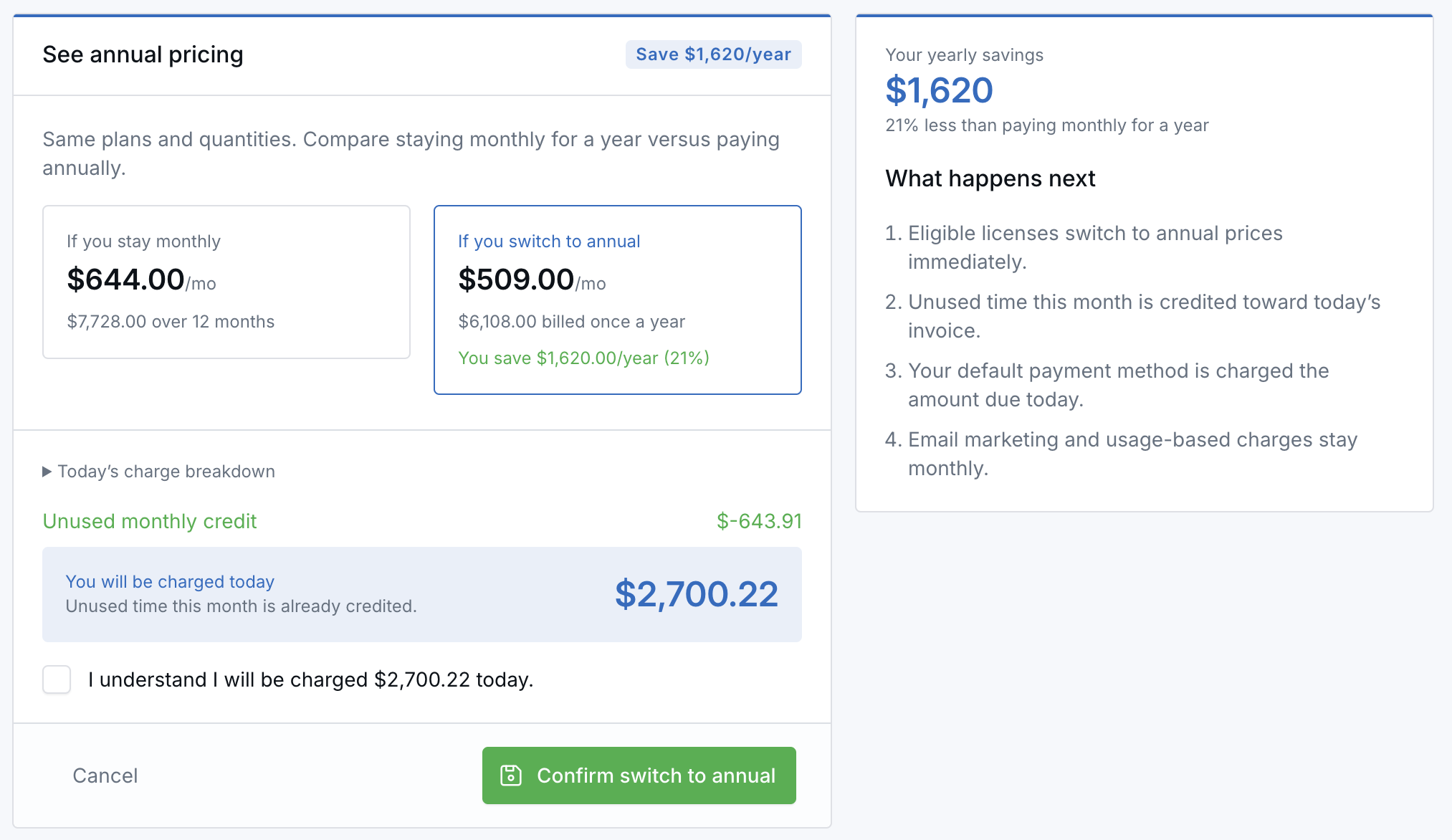
Unused time from your current monthly period is credited toward the invoice. Your default payment method is charged the prorated amount due today, and the eligible licenses renew annually after the switch.
Why It Matters
- Access discounted annual pricing — Move eligible licenses from monthly pricing when annual billing fits your budget.
- Know the charge before confirming — Review credits, annual totals, and the exact amount due today in one place.
- Manage billing on your schedule — Complete the change directly from your Subscription page.
Questions? support@leadcenter.ai

Need more help?
If you can't find the answers you're looking for, our support specialists are available to answer your questions and troubleshoot if necessary.
-
Phone Call (888) 291-7116. Our main hours are Monday to Friday 7 am-5 pm Central Time.
-
Support Send your questions and inquiries via email to support@leadcenter.ai. A support ticket will be created and one of our team members will get back to you as quickly as possible.